How do I set up a double sided card using Easybadge?
To print a double sided card you need to go to the main menu (three lines in top left) and select edit design, pic 1.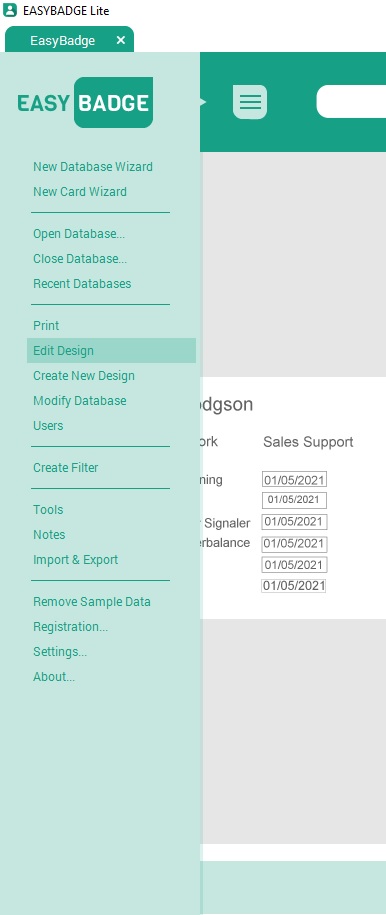
Then you will need to select card setup, picture 2.
Then finally, select the check box for 2 sided design and then go to design mode and create the card.
Related Articles
Get more value out of your Card Printer
Card Printers aren't just for ID Cards I0 other ways to use your Plastic Card Printer Printed your staff cards for the year? Is your ID Card printer now back on the shelf where it will most likely gather dust until next year? Rather than just ...Why you should clean your Card Printer regularly
Keep your printer running smoothly and protect your investment A well-maintained ID card printer produces the best quality printed cards time and time again and rewards you with years of loyal service. Why cleaning your printer is so important The ...How do I register my Easybadge software?
To register your Easybadge licence you will need to select the main menu button (three lines at the top left) and then select the registration option. The below image will pop up for you to enter your details. Once done, it might take a reboot for ...How to print a Magicard 300 test card.
Does the printer have ‘Status’? As you may probably already aware. The correct operation is ‘ Printer connected’ Establish this first, otherwise everything will be irrelevant which ever application it maybe. Additionally, Start working towards the ...How to get rid of imperfections on your cards
Debris & Dirt Surface imperfections such as bumps, ripples, spots and halos are extremely small issues that provide a noticeable effect on the texture of your card, producing an uneven print that can ruin a printed card’s appearance. Imperfections ...